Online selling has never been easier, largely because of platforms like Amazon FBA. Amazon’s fulfilment eliminates the need for packing, shipping, and storage. Simply ship your goods to Amazon’s fulfilment centres, and they will take care of the rest. This is the ideal business plan, isn’t it?
Well… not entirely.
Behind the convenience of FBA Amazon lies a complex fee structure that can quietly eat into your profits if you’re not paying attention. With improved fee models, rising storage costs, and stricter inventory regulations, sellers are under greater pressure than ever in 2026.
You’re not alone if you’ve ever glanced at your revenue and wondered, “I’m making sales, but where is the money going?” That’s exactly where most sellers struggle.
To really understand the issue, you first need to understand what Amazon FBA is beyond the surface level. It’s not just a logistics solution; it’s a system with multiple cost layers. These include fulfilment fees, monthly storage charges, long-term storage penalties, removal fees, and even additional surcharges for slow-moving inventory. Many of these fees aren’t obvious at first glance.
This is where things start to get interesting and a little frustrating.
Many sellers jump into FBA expecting passive income but end up with shrinking margins. Why? Because they don’t actively track or optimise their costs. Something as simple as incorrect product dimensions or holding excess inventory for too long can lead to unnecessary charges.
That’s why tools like the Amazon FBA calculator have become essential. Before even listing a product, smart sellers now calculate expected fees, estimate profit margins, and make informed decisions. If you wish to remain competitive, it is no longer optional; it is required.
Avoiding excessive Amazon fees isn’t about working harder; it’s about working smarter.
From better inventory planning and product optimisation to tracking hidden charges and claiming reimbursements, there are proven strategies that can help you take back control of your profits. And once you understand how the system works, it becomes much easier to spot where you’re losing money and how to stop it.
In this guide, we’ll break down the best FBA practices to avoid Amazon’s fees in a way that’s simple, practical, and actually useful. Just real insights that help you keep more of what you earn. Because at the end of the day, selling on Amazon isn’t just about making sales, it’s about making profitable sales.
FBA fees quietly eating into your profits.
Smart fee‑cutting that protects margins.
What is Amazon FBA & How Its Fee Structure Works?
This is the one area you really need to understand if you intend to sell on Amazon or are already selling but aren’t achieving the promised revenue.
Sellers can work with Amazon via Amazon FBA (Fulfilment by Amazon) to manage all the logistics. Rather than keeping your goods at home or personally managing shipping, you drop them at Amazon’s fulfilment facilities. Amazon next takes care of returns, shipment, packaging, warehousing, and even customer service.
It functions essentially like this:
You ship items; Amazon stores them; a consumer orders; Amazon delivers it.
This is what makes FBA Amazon so attractive. It removes operational stress, gives you access to Prime customers, and allows you to scale your business without worrying about logistics. Still, this convenience comes at a cost, and not just one.
Complete Breakdown of Amazon FBA Fees in 2026
Fulfillment Fees
Charged per unit sold, fulfilment fees cover picking, packing, shipping, and customer service. Rates are based on your product’s size tier and weight. A small standard-size item weighing under 6 oz currently costs around $3.22 per unit to fulfil. A large standard item at 1 lb costs approximately $4.45. Step up to large, bulky, and you’re looking at $9.73 or more.
Monthly Storage Fees
Charged per cubic foot, based on how much space your inventory occupies in Amazon’s fulfilment centres. Rates from January through September run $0.78 per cubic foot for standard-size items. From October through December, that number triples to $2.40 per cubic foot because Amazon’s warehouses are flooded during the holiday rush and it charges accordingly.
Aged Inventory Surcharges
This one bites many sellers. When products sit in Amazon’s warehouse past 181 days, additional surcharges kick in: $0.50 per cubic foot from 181–365 days, escalating to $6.90 per cubic foot or more beyond 365 days. Products that don’t move aren’t just dead weight; they become increasingly expensive to hold.
Referral Fees
Amazon charges a referral fee on each sale, regardless of fulfilment mode. For some categories, rates typically range from 8% to 15%. Although category choice is non-negotiable during product research, it may affect prices.
Inbound Placement Service Fee
Introduced in April 2024, this fee applies when you send inventory to a single fulfilment centre rather than distributing it across Amazon’s network. More on this in Section 5; it’s one of the most misunderstood fees currently active.
Return Processing Fees
Charged per unit when your return rate exceeds category benchmarks. For Apparel and Shoes, a flat fee applies per returned unit regardless of volume. Rates range from $2.12 to $6.85 per unit.
Unplanned Service Fees
Triggered when your inventory arrives at Amazon’s fulfilment centre improperly labelled, packaged, or prepared. Entirely preventable. Entirely annoying when they show up on your statement anyway.
Low Inventory Level Fee
Introduced in 2024, this fee penalises sellers who consistently run low on stock. If both your 30-day and 90-day historical supply for a given SKU fall below 28 days, you’re charged up to $1.11 per unit sold. Amazon’s logic: small inventory slows down its distribution network.
Why Most Sellers Overpay Amazon Without Realising It?
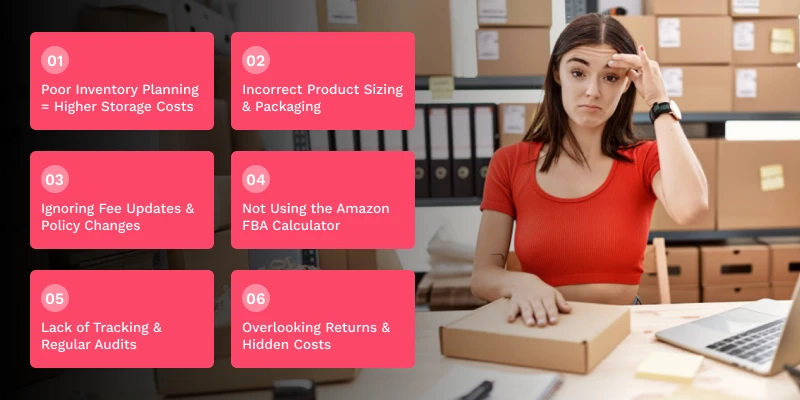
If you’ve ever felt like your sales are doing fine, but your profits aren’t adding up. You’re not imagining it. One of the biggest challenges with Amazon FBA is that the costs aren’t always obvious. Unlike traditional business expenses, FBA fees are layered, dynamic, and sometimes easy to overlook. That’s exactly why many sellers end up overpaying without even realising where the money is going.
Let’s break down the most common reasons behind this:
- Poor Inventory Planning = Higher Storage Costs
A lot of sellers either overstock or understock, and both can hurt your profits. When you send too much inventory to Amazon, and it doesn’t sell quickly, you start paying monthly storage fees and eventually long-term storage fees. These charges increase over time and can seriously eat into your margins.
On the other hand, running out of stock too often might result in low inventory level fees and harm your rankings. Smart inventory management is essential, but many vendors overlook it until the costs accumulate.
- Incorrect Product Sizing & Packaging
This is one of the most underestimated mistakes in FBA on Amazon. Amazon bases its fulfilment rates on size and weight. Even a little increase in dimensions (such as bulky packing) can place your product in a higher fee category.
Many sellers don’t optimise packaging or verify how Amazon measures their product, leading to higher fulfilment charges than expected.
- Ignoring Fee Updates & Policy Changes
Amazon routinely adjusts its charge structure, particularly in recent years. From additional fees to changes in storage prices, these improvements can have a direct influence on your profits.
But the reality is, most sellers don’t actively track these changes. So while you think your margins are stable, your costs may actually be increasing in the background.
- Not Using the Amazon FBA Calculator
A surprising number of sellers skip this step. The Amazon FBA calculator helps estimate all the costs involved before you list a product.
Without it, you’re basically guessing your profit margins. This often leads to underpricing, overpricing, or worse, selling products that aren’t profitable at all.
- Lack of Tracking & Regular Audits
Many sellers don’t track their accounts closely. Amazon processes millions of transactions, and mistakes can happen, such as:
- Lost or damaged inventory
If you’re not auditing your account regularly, you could be losing money without even noticing it.
- Overlooking Returns & Hidden Costs
Returns are a common feature of e-commerce, but they come with a price. Hidden charges, such as return processing fees and unsold goods, can discreetly erode your revenues. Poor product quality or unclear listings often make this problem worse.
What is Smart Inventory Management to Avoid Storage & Aged Fees?
Inventory management is a cost-control method for running a profitable Amazon FBA business.
While neglecting one major aspect: how their inventory works within Amazon’s warehouse, many vendors focus mostly on product choice and marketing. What came of it? Increasing storage expenses, exhausted inventory fees, and sluggish cash flow.
Then what specifically defines effective inventory control?
Understanding Smart Inventory Management

Smart inventory management is keeping the correct balance of stock, ensuring you have enough inventory to meet demand, but not so much that it sits unsold for long periods. In FBA Amazon, this balance is crucial because Amazon charges you for both space and time. The longer your products stay in storage, the more you pay.
This is where many sellers go wrong; they treat inventory as an asset when, in reality, unsold inventory quickly turns into a liability.
Why Poor Inventory Management Leads to Higher Fees?
Amazon’s fee structure is designed to reward efficiency. If your products sell quickly, your costs remain controlled. But if your inventory moves slowly, you face:
- Monthly storage fees for space usage
- Long-term (aged) inventory surcharges
- Increased risk of unsold or stranded stock
- Reduced cash flow tied up in inventory
This is why understanding what Amazon FBA is at a deeper level matters; it’s not just about fulfilment, but also about how efficiently you manage your stock within the system.
Key Strategies to Manage Inventory Smartly
To avoid unnecessary fees, sellers need a structured approach. Here are the most effective strategies:
- Improve Inventory Turnover
The less you pay on storage charges, the faster your items sell. Concentrate on keeping a steady sales velocity instead of hoarding sizable volumes of stock.
- Avoid Overstocking
Though sending extra inventory to Amazon looks like a wise option, it frequently leads to higher warehousing costs. Instead of that, fill in data-driven volumes.
- Use Demand Forecasting
To calculate your required inventory, study historical sales trends, seasonal demand, and market patterns. This reduces the danger of overstocking or understocking. Determine how storage costs might influence your overall profit using resources such as the Amazon FBA calculator before making inventory decisions.
- Monitor Inventory Ageing
Watch closely how long your items have been stored. Before they accumulate long-term fees, Amazon offers inventory ageing reports to spot slow-moving products.
- Remove or Liquidate Dead Stock
Holding onto a product that isn’t selling will just increase expenditures. Running promotions, offering discounts, or clearing out goods before it expires could all help cut losses.
What are the Product Optimisation Strategies to Reduce Fulfilment Costs?
In Amazon FBA, your product immediately affects how much you spend in fulfilment costs; product optimisation is a vital element of operating a successful company. While neglecting how packaging, size, weight, and listing information affect expenses, many suppliers focus mostly on raising sales.
Over time, even modest inefficiencies may lead to higher costs. Knowing what Amazon FBA is at this level lets you see how wise product choices might significantly reduce costs and improve margins in Amazon FBA.
Key Product Optimisation Strategies:
Optimise Packaging Efficiently
Select tiny, well-fitted packaging that protects the product without adding extra size. Large packaging raises fulfilment costs as dimensional weight rises.
Reduce Product Size & Weight
Even slight changes in weight or dimensions could propel your product into a less costly category. Think about more small designs or lighter materials to cut expenditures.
Ensure Accurate Product Classification
To prevent more referral or fulfilment costs resulting from misclassification, list your product in the appropriate category.
Maintain Listing Accuracy
Always supply the precise measurements, weight, and product specifications. Incorrect data can lead to re-measurement by Amazon and unexpected fee increases.
Use the Amazon FBA Calculator
Using the Amazon FBA calculator, calculate costs, investigate a range of scenarios, and verify your product remains profitable before cataloguing or changing it.
These techniques enable you to match your product with Amazon’s pricing approach, therefore reducing costs without affecting quality or customer experience.
How to Use the Amazon FBA Calculator to Maximise Profit?
Selling on Amazon FBA without the calculator means you are essentially guessing your earnings, therefore taking a perilous gamble. Among the most essential instruments for estimating your profits before you publish a product is the Amazon FBA calculator. In a system like FBA Amazon, where many costs are at play, openness could determine profit versus loss.
Here’s how to use it successfully to protect and increase your margins:
Start with Pre-Listing Cost Estimation
Before releasing any product, input Amazon FBA calculator data like selling price, product cost, shipping cost, size, and weight. By clearly estimating your fulfilment fees, referral fees, and storage expenses, this lets you know what to expect up front.
Understand Your Real Profit Margin
The calculator doesn’t just show fees; it shows your net profit. This helps you understand how much you’re actually making per unit after all deductions. Many sellers skip this step and end up selling products with very low or even negative margins.
Test Different Pricing Scenarios
Experimenting is among the most intelligent uses of the calculator. Experiment with a range of pricing points to note how your profit varies. This lets you identify the sweet spot where your product is profitable as well as competitive.
Optimise Based on Size & Weight
In the calculator, you can also adjust product dimensions and weight to observe how fulfilment expenses fluctuate. This is especially helpful when doing design or packaging modifications since even little changes may have significant financial benefits.
Use It for Product Comparison
Should you be deciding among several product concepts, the calculator lets you weigh them on the basis of profitability. You can depend on actual numbers instead of estimating which one will perform better.
Apply It to Real-Life Decision Making
For instance, the calculator might indicate a reduced profit margin for one option if two comparable goods have the same selling price but one weighs slightly more. This insight allows you to choose the more cost-efficient product. If you’re selling on Amazon FBA without using the calculator, you’re basically guessing your profits, and that’s a risky game.
How to Avoid Hidden Fees, Returns, and Costly Seller Mistakes?
One of the biggest reasons sellers struggle with profitability in Amazon FBA isn’t just the visible fees; it’s the hidden costs that slowly add up over time. These are the costs you first miss but eventually greatly impact your margins. Little errors can become costly lessons if you’re not cautious of unexpected return costs, listing mistakes, and over-storage fines.
Knowing where these secret costs come from and acting preemptively to manage them will enable you to avoid these problems.
Here’s how you can avoid hidden fees and protect your profits in FBA Amazon:
Minimise Return-Related Costs
Returns are a component of e-commerce, but too many of them might soon compromise your earnings. Higher return rates sometimes result from bad product quality, deceptive photographs, or hazy descriptions. To establish the correct expectations and lower needless returns, concentrate on precise listings, excellent photographs, and unambiguous product information.
Avoid Listing Errors and Inaccurate Information
Your product listing is not just for customers; it’s also how Amazon determines your fees. Higher fulfilment fees or re-measurement by Amazon can be brought on by wrong measurements, weight, or category. Always double-check your listing details to avoid paying too much and guarantee accuracy.
Control Over-Storage and Aged Inventory Fees
High storage expenses and long-term inventory charges may result from sending excessive inventory without suitable preparation. Watch your inventory levels often to avoid slow-selling overstocked goods. Smart inventory planning is critical in keeping storage expenses in check.
Watch Out for Common Beginner Mistakes
Many new sellers jump into FBA on Amazon without fully understanding how the system works. Some common mistakes include ignoring fee updates, not tracking expenses, and pricing products without considering all associated costs. Understanding what Amazon FBA is beyond the basics helps you avoid these pitfalls early on.
Use the Amazon FBA Calculator for Better Decisions
The Amazon FBA calculator can help you estimate not just standard fees but also how returns, storage, and pricing impact your overall profitability. Using it before listing or pricing a product helps you avoid surprises later.
How to Track Lost, Damaged & Incorrectly Charged Inventory (Reimbursements)?
Not all losses from selling through Amazon FBA come from obvious costs; others result from unreported operational mistakes. At various phases of the fulfilment process, inventory can become lost, damaged, or erroneously billed; if you are not diligently tracking it, you may miss out on money Amazon really owes you. Knowing what Amazon FBA is also helps you to realise that reimbursements are not always automated; you must find and claim them to safeguard your margins in Amazon FBA.
Key Areas to Track for Reimbursements:
Units that go missing during inbound shipping, warehouse transfers, or storage are never added to your sellable inventory.
Products that become unsellable due to damage within Amazon’s fulfilment centres during handling or storage.
Instances where consumers get refunds, but the returned item is not restocked or recorded in your stock.
- Overcharged Fulfilment Fees
Incorrect fees applied due to wrong weight or dimension measurements by Amazon.
Regular examination of inventory, shipments, and returns reports helps to spot discrepancies before claim expiration dates.
- Compare Expected vs Actual Costs
Use the Amazon FBA calculator to estimate correct fees and identify any overcharges in your account.
- Be Aware of Claim Windows
Timely tracking is critical as Amazon has tight deadlines for the submission of reimbursement claims.
- Use Automated Reimbursement Tools
Tools such as ValueBack.ai find mistakes, record inconsistencies, and file claims automatically, hence saving time and guaranteeing you don’t overlook receivable revenue.
How Valueback.ai Helps You Recover Lost FBA Money & Boost Profits?
A large amount of your lost profits in Amazon FBA stems not from weak sales but from unnoticed mistakes like lost inventory, damaged goods, and erroneous fee charges.
Many vendors leave money behind without even noticing it since these problems are not always paid for. That’s where ValueBack.ai becomes a powerful ally. It simplifies the complex process of tracking, identifying, and recovering these losses, helping sellers protect their margins and run a more efficient FBA Amazon business.
How ValueBack.ai Helps:
- Automated Account Monitoring
Continuously scans your seller account to detect issues like lost, damaged, or unaccounted inventory.
- Identifies Missed Reimbursements
Finds cases where Amazon owes you money but hasn’t issued a refund.
Simplifies or automates the refund claim process, therefore saving you both effort and time.
Highlights incorrect fulfilment or storage charges by comparing expected vs actual costs.
- Saves Time with Automation
Especially helpful as your order volume increases, it gets rid of the need for hand tracking.
- Provides Actionable Insights
Helps you understand patterns of losses so you can prevent them in the future.
- Works Alongside Cost Planning Tools
Complements tools like the Amazon FBA calculator by helping you not just estimate costs, but recover lost revenue.
- Essential for Modern Sellers (2026)
With increasing complexity in Amazon FBA, automated tracking and recovery tools are becoming a necessity, not a luxury.
FBA costs are shrinking your bottom line.
Reduce fees without risking margins.
Conclusion
Selling through Amazon FBA today is about knowing where your money goes and ensuring you retain as much of it as possible, not just about generating more orders. Knowing what Amazon FBA is is not quite enough now as fees rise, regulations change, and rivalry grows.
Successful sellers are those who actively control their expenses by means of more efficient inventory planning, superior product optimisation, or through the use of tools like the Amazon FBA calculator to make educated decisions before publishing or pricing a product.
At the same time, hidden losses like incorrect charges, lost inventory, or missed reimbursements can quietly reduce your profits if left unchecked. In FBA on Amazon, therefore, using smart tactics with appropriate tools like automated tracking and recovery systems has become imperative. It is about running smarter, remaining alert, and being proactive in 2026 rather than only selling more.
In the end, building a profitable Amazon business comes down to one simple mindset: don’t just focus on revenue, focus on retention of profit. When you reduce unnecessary fees, recover lost money, and optimise every step of your process, you turn Amazon’s complex system into your advantage, and that’s what truly sets successful sellers apart.
- What is Amazon FBA, and how does it charge sellers?
Amazon FBA is a fulfilment service where Amazon stores, packs, and ships your products. It charges fees for fulfilment, storage, and referrals, which vary based on product size, weight, and category.
- How can I reduce Amazon FBA fees effectively?
You can reduce fees by optimising product size and packaging, managing inventory efficiently, and avoiding long-term storage charges. Using tools like the Amazon FBA calculator also helps in planning costs better.
- Why do many sellers overpay on FBA Amazon?
Most sellers overpay due to poor inventory planning, incorrect product dimensions, and not tracking hidden charges. Lack of regular audits also leads to missed cost-saving opportunities.
- What are the hidden Amazon FBA fees I should watch out for?
Hidden fees include long-term storage charges, return processing fees, and overcharged fulfilment costs. Lost or damaged inventory can also lead to indirect losses if not tracked properly.
- How can I recover lost money from Amazon FBA?
You can recover money by tracking discrepancies like lost inventory, damaged goods, or incorrect fees and filing reimbursement claims. Automated tools can simplify this process and ensure you don’t miss eligible refunds.